
Product overview
CoachEye: The connected development platform for racquet-sport training
CoachEye helps athletes, coaches, parents, clubs, and academies turn everyday racquet-sport training into a structured, measurable, and video-supported development process.
Instead of keeping training plans, notes, videos, and progress history in separate places, CoachEye connects the full development workflow in one platform — from planning and training content to Smart Court capture, AI-assisted video review, analytics, and long-term progress tracking.
CoachEye is built for athletes, parents, and coaches in racquet sports, helping athletes understand what to work on, parents see how development is progressing, and coaches manage training with greater clarity and confidence. See About CoachEye for the platform story.
Our Mission
At CoachEye, our mission is to make athlete development more structured, transparent, and measurable.
Racquet-sport training often depends on fragmented information: separate calendars, scattered notes, isolated videos, subjective feedback, and progress that is difficult to explain over time. CoachEye brings planning, training execution, video review, AI-supported analysis, and development tracking into one connected environment.
By connecting what was planned, what happened on court, what was captured on video, and how performance changes over time, CoachEye helps every session become part of a long-term improvement system.
The result is a training process that is not only more organized, but also more measurable and more informed. More detail: About CoachEye.
The CoachEye Development Loop
CoachEye is built around a simple development loop:
Plan → Prepare → Train → Capture → Analyze → Improve
This loop helps athletes and coaching teams move from isolated training sessions to a repeatable development system.
Plan
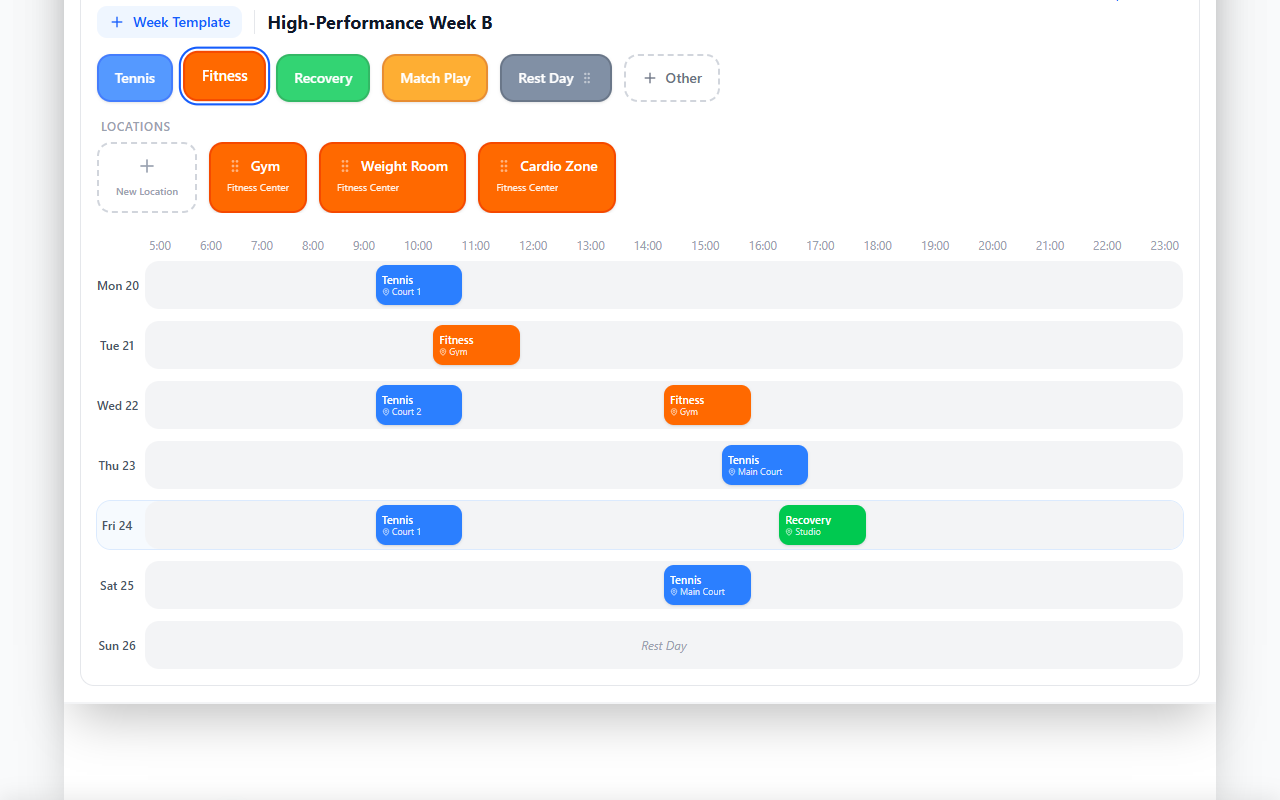
Use Today and Development Plans to organize daily and weekly work, schedule sessions, structure training blocks, and keep the wider training week visible.
Prepare
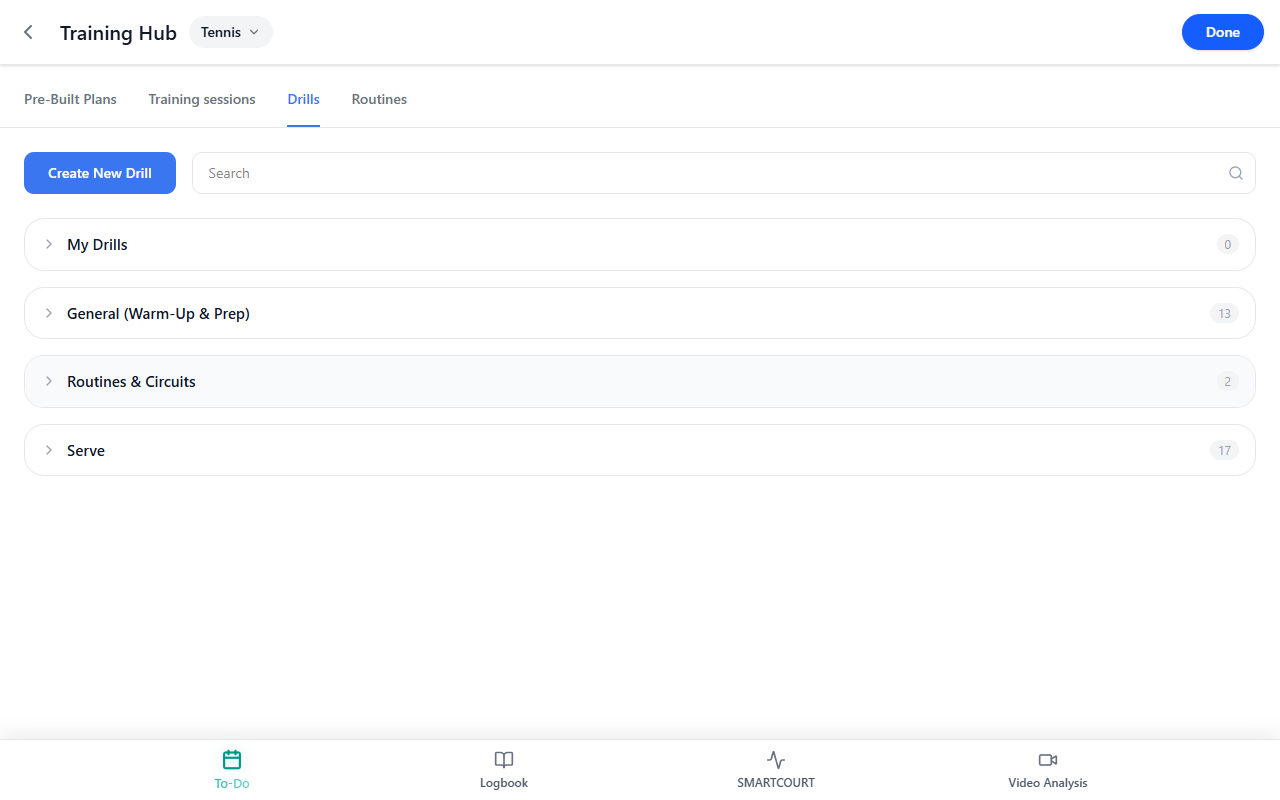
Use Training Hub, Drills Collection, and reusable session templates to prepare purposeful training instead of improvising each session from scratch. Session templates and saved blocks live in Training sessions.
Train
Run structured sessions on court, start drills during live training, manage participants, and keep the session connected to the training plan. Guides: Starting drills during a session · Smart Court: Start New Session.
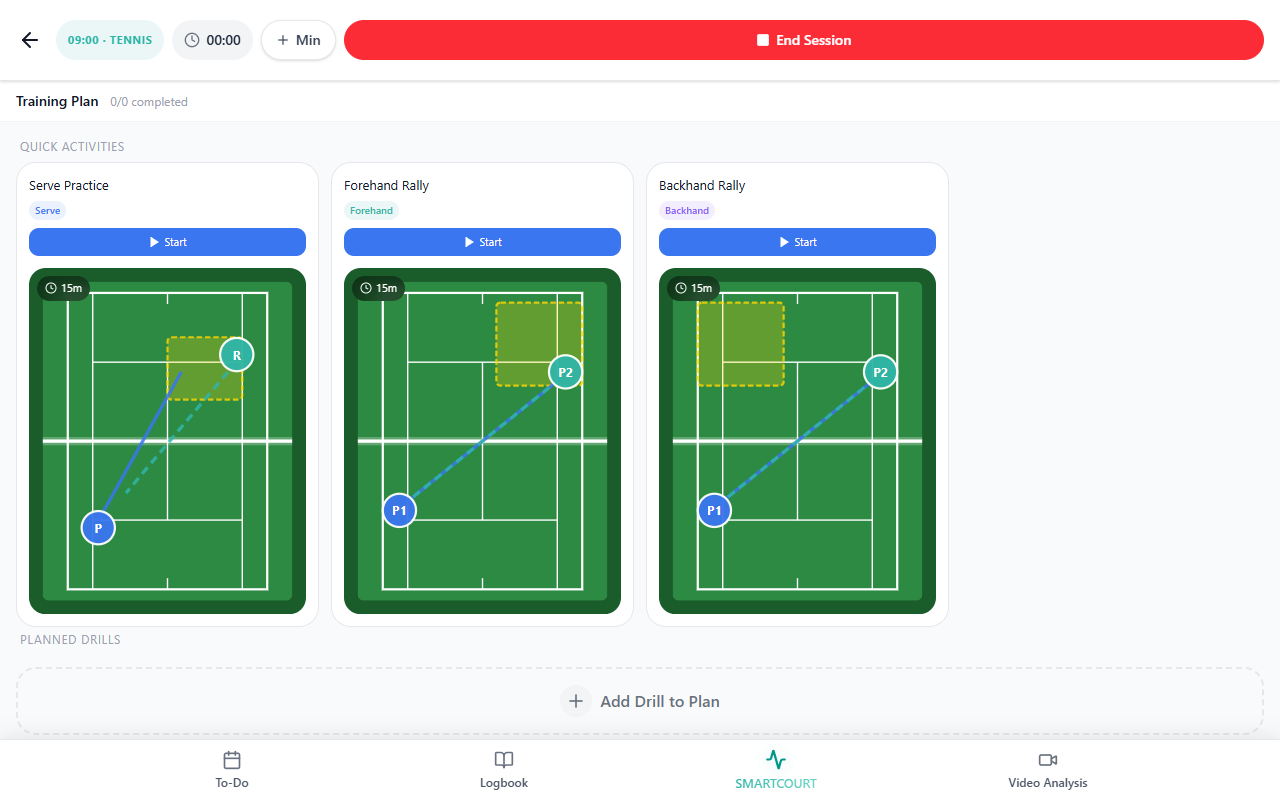
Capture
Use Video & Smart Court and Smart Court to record training sessions, matches, drills, and relevant performance moments with connected camera and court workflows.
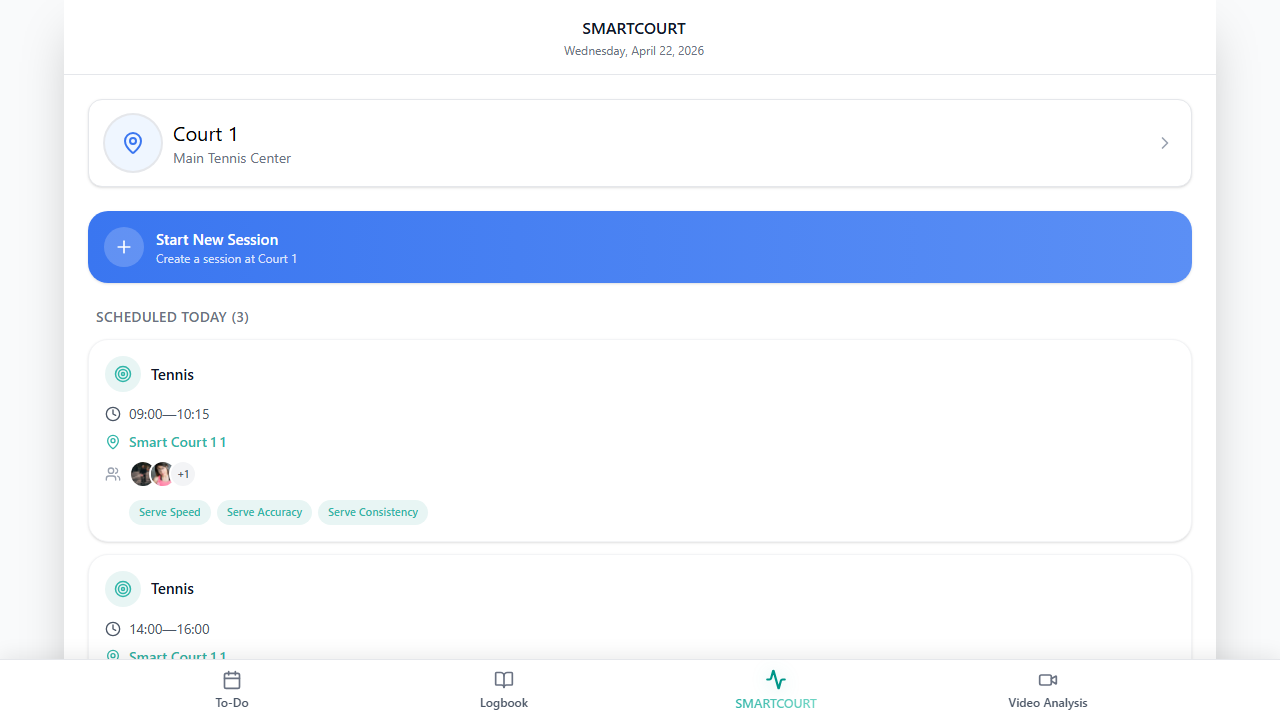
Analyze
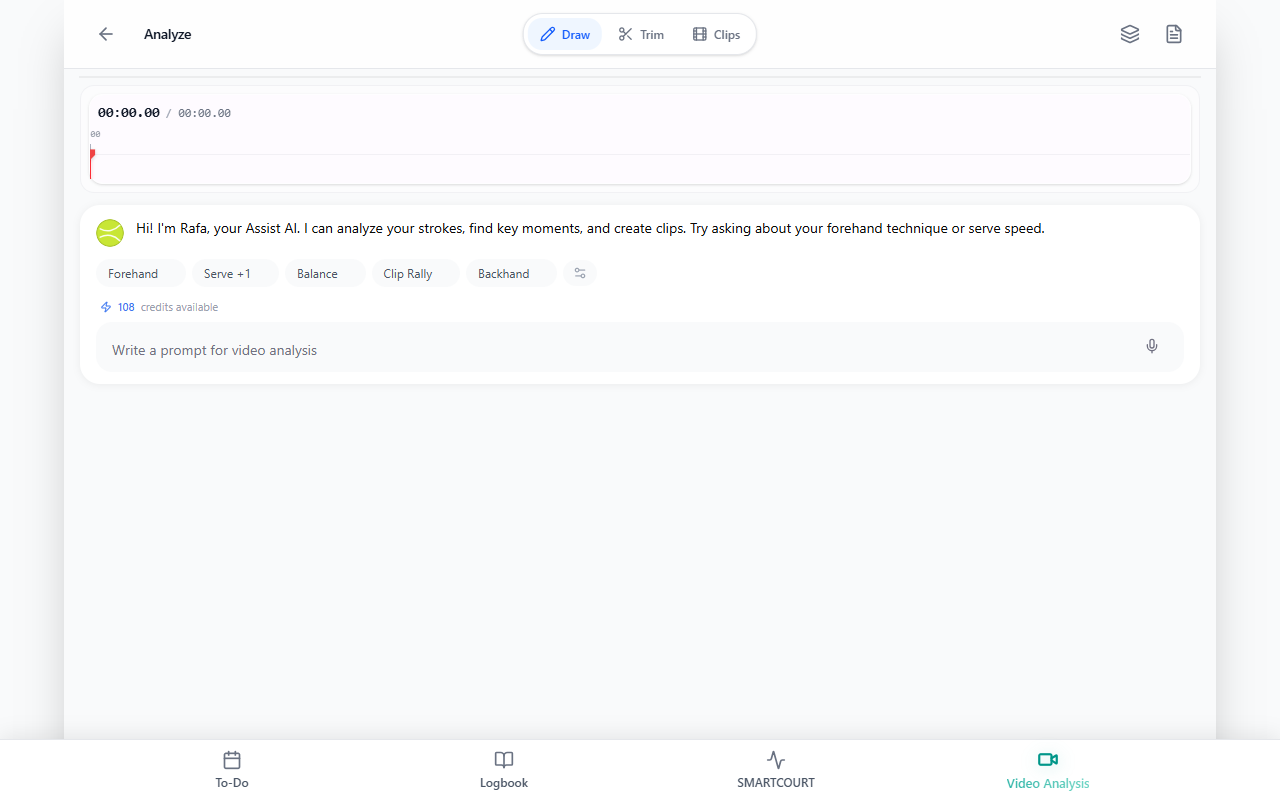
Review footage, slow video down, mark important moments, add notes, and use Assist questions when available to deepen performance review — Video Analysis.
Improve
Use Logbook, Analytics & Progress, and session history to understand what is changing over time and decide where the next training focus should go.
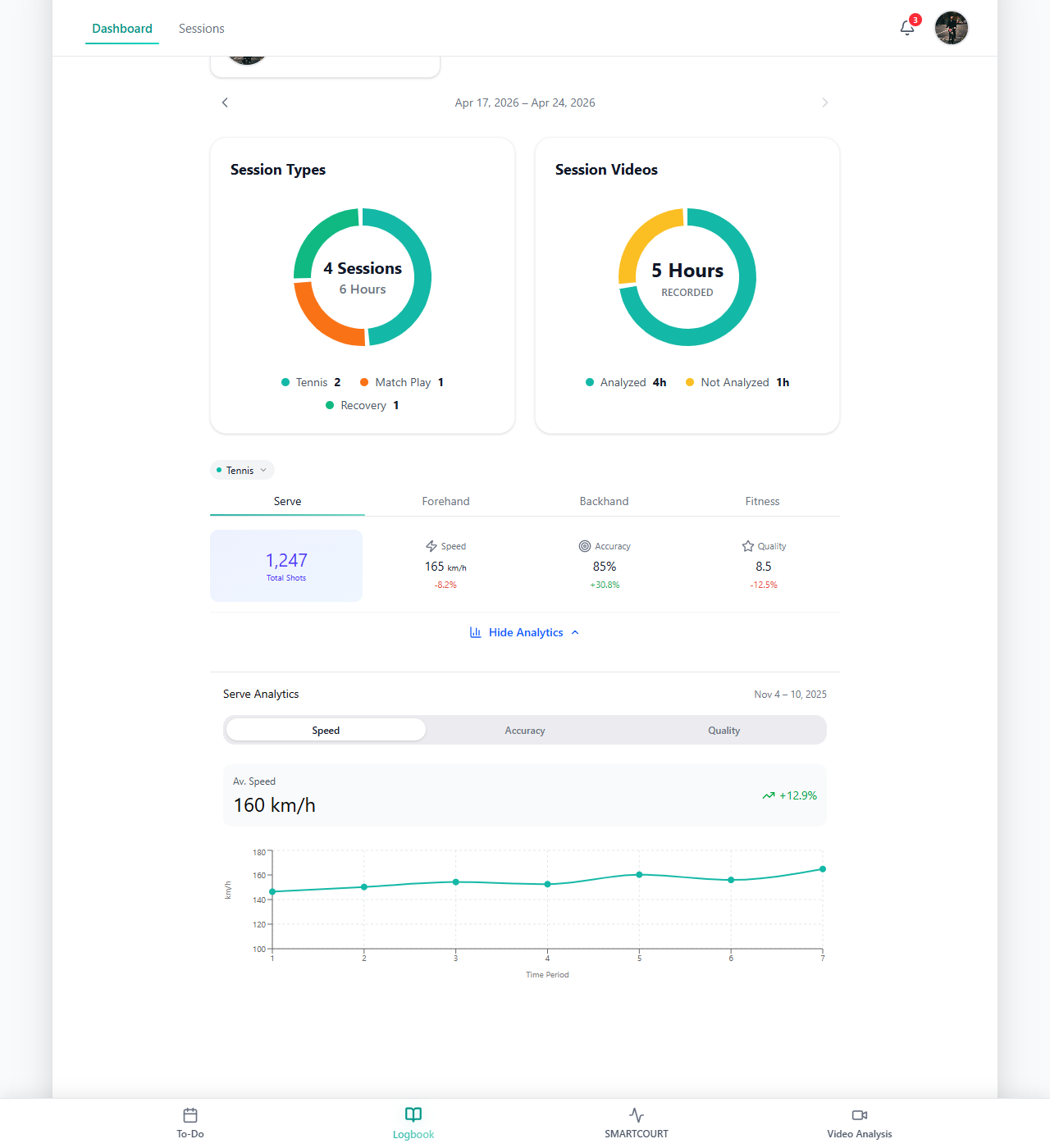
This connected loop helps coaches, athletes, and support teams turn training activity into clearer decisions and more consistent development.
Who CoachEye Is Built For
CoachEye is designed for the full racquet-sport development ecosystem.
Athletes
For athletes, CoachEye provides structure, visibility, and ownership. It helps them follow training plans, use better practice content, review their own performance, track development honestly, and prepare more intelligently for competition — For Individual Athletes.
Coaches
For coaches, CoachEye helps organize sessions, manage multiple athletes, document progress, use video more effectively, and turn training data into a real coaching asset — For Coaches.
Parents
For parents, CoachEye creates better visibility into the development process. Instead of relying only on match results or short post-session comments, parents can understand training history, progress trends, stored video, and AI-supported analysis when available — For Parents.
Clubs and academies
For clubs and academies, CoachEye supports a more consistent and scalable training system. It helps organizations connect coaching methodology, session structure, on-court capture, analytics, and player development into one operational workflow — For Clubs & Academies.
What You Can Achieve with CoachEye
Structure training with clarity
CoachEye helps users organize the training day and the wider development plan.
Today gives athletes, parents, and coaches a focused view of what is planned, what has already happened, and what still needs attention. Development Plans support weekly planning and help connect day-to-day execution with longer-term development goals.
This makes training easier to manage, easier to follow, and easier to adjust when priorities change.
Build better sessions with Training Hub
Training Hub gives users access to drills, routines, training items, and reusable content. Coaches and athletes can browse available materials, open details, save useful content, and gradually build their own working library.
This helps training become more intentional. Instead of filling time with random exercises, users can select drills based on the skill, pattern, or development goal they want to work on — Drills Collection.
For coaches, saved drills and session templates reduce repetitive preparation work. For athletes, reusable routines make independent practice more structured and consistent.
Create reusable training systems
CoachEye supports reusable training structures through session templates, drills, saved content, and custom drill creation.
A training session can be built around a clear objective, ordered drills, focus, duration, and supporting details — Training sessions. Users can also create their own drills with coaching cues, skills developed, target zones, duration, and practical instructions — Create New Drill.
Over time, this turns the product into a personalized training system — built from ready-made content and the coach’s or athlete’s own methodology.
Connect the court to the training workflow
Smart Court helps connect real training locations with digital training workflows.
Users can work from a court-focused view, start new sessions, connect cameras, manage recordings, and move from on-court activity into later review and analysis.
Smart Court acts as a bridge between:
- planned training;
- on-court execution;
- camera capture;
- session data;
- video review;
- Logbook history.
This allows training activity to remain connected to the broader development record, instead of disappearing after the session ends.
Make video part of the development process
CoachEye helps turn video from a passive recording into an active coaching and learning tool.
With Video Analysis, users can add or choose footage, upload video, record new video, add footage from session recordings, slow playback down, mark key moments, leave notes, and use Assist questions in plain language when available.
Video helps users move from memory-based feedback to more visual and objective review. Coaches can explain moments more clearly, athletes can see corrections more directly, and parents can better understand what is happening in training — see also Video & Smart Court.
Video does not replace coaching judgment. It strengthens it by making feedback easier to see, revisit, and connect to future training.
Track progress over time
Logbook brings training history together in one place.
It helps users see what was planned, what was completed, and how training is developing over time. Users can move between dashboard views, session history, video records, and analytics when available.
Analytics & Progress becomes especially valuable when structured training data, stored video, and AI-supported recognition work together. CoachEye can help surface metrics, patterns, and signals that would be difficult to track manually at scale.
This makes progress easier to review, easier to explain, and easier to connect to future decisions.
Collaborate around the same development picture
CoachEye supports collaboration between the people involved in athlete development.
View and manage shared training logbooks allows users to view, manage, switch, share, or access athlete-centered training records, depending on permissions and invite flows available in the product.
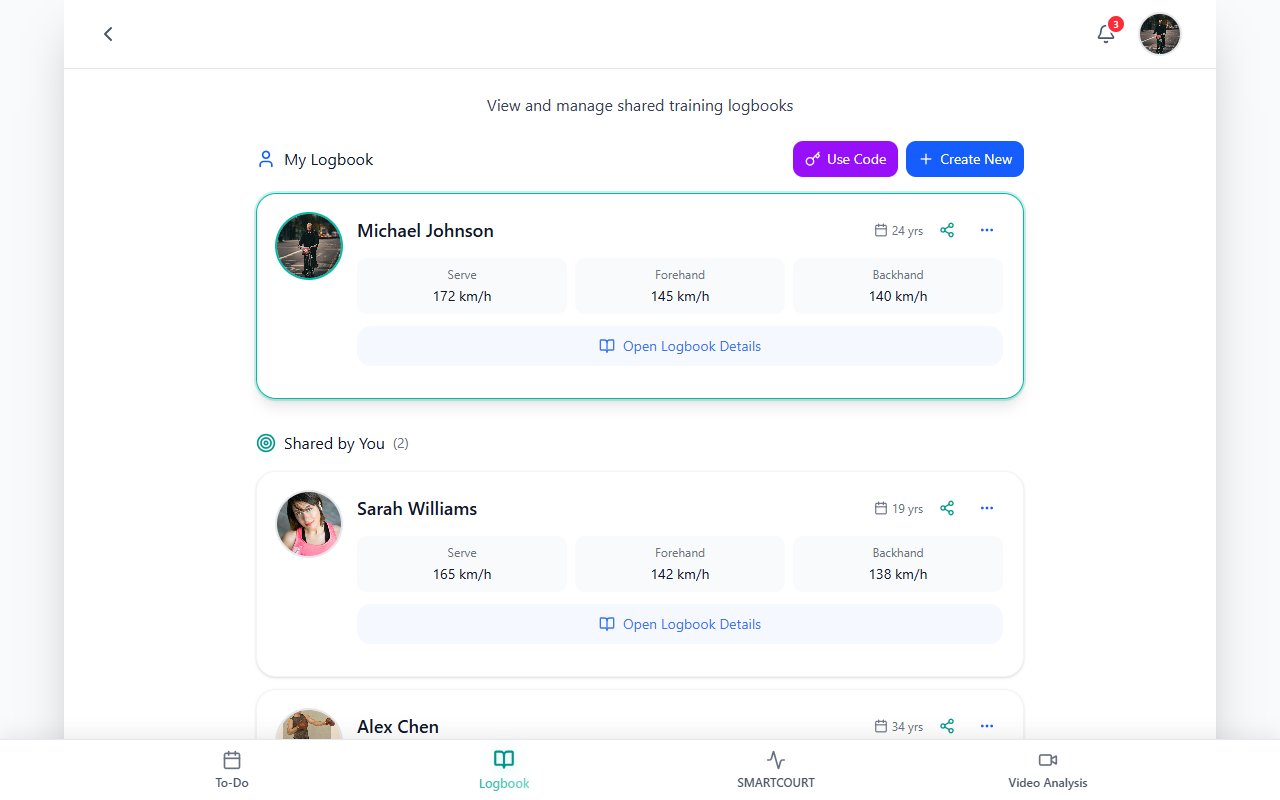
This is especially useful for:
- families supporting one athlete;
- coaches working with multiple players;
- academies managing many athletes;
- parents who need visibility without controlling every training detail;
- coaching teams that need a shared view of history and progress.
The goal is simple: everyone involved should work from the same development picture.
Core Product Experience
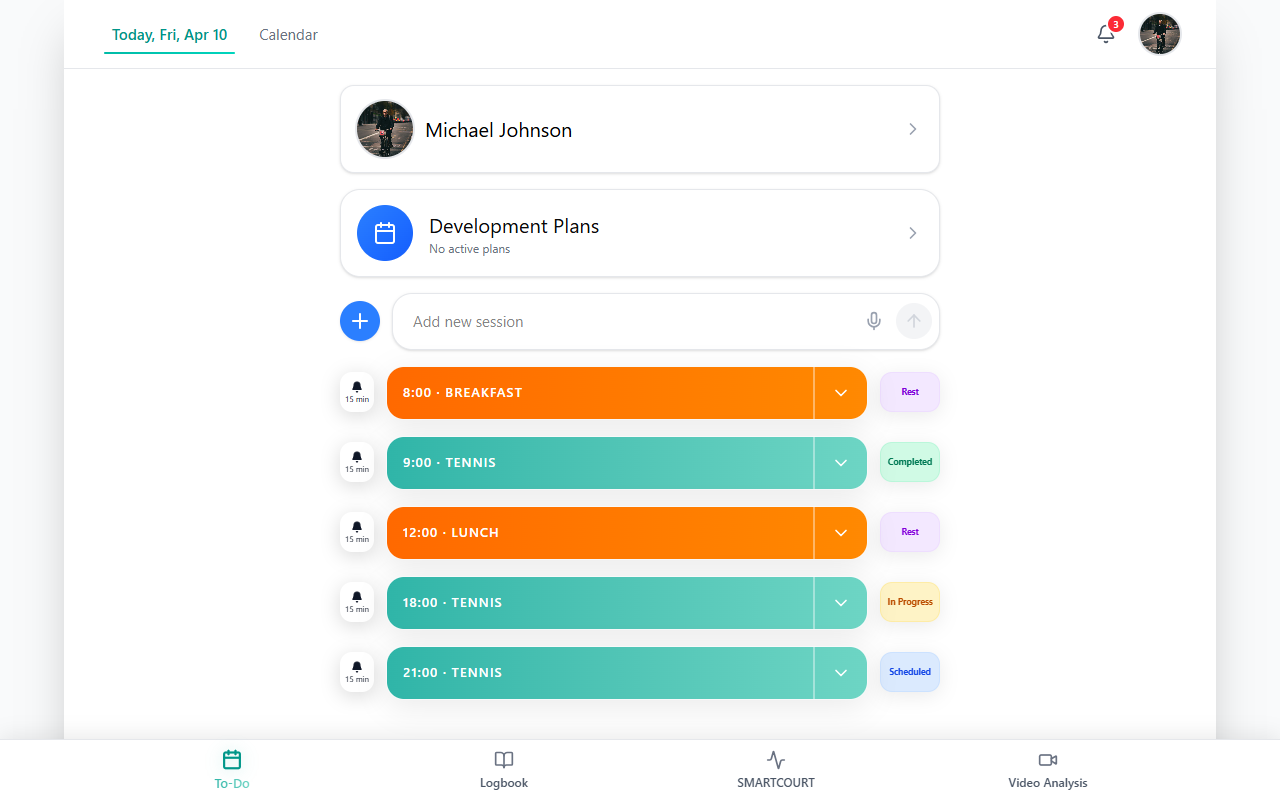
Today
Today is the daily execution surface in CoachEye.
It helps users see the current day clearly: scheduled sessions, training items, follow-ups, tasks, meals, routines, and other planning entries depending on setup.
Use Today when you need to:
- understand what is planned now;
- see what has already happened;
- manage the day’s training flow;
- add a new session;
- keep daily execution connected to the wider training process.
Today is especially useful on packed training days, when it is easy to lose track of the next session, miss a follow-up, or forget a small but important task.
Logbook
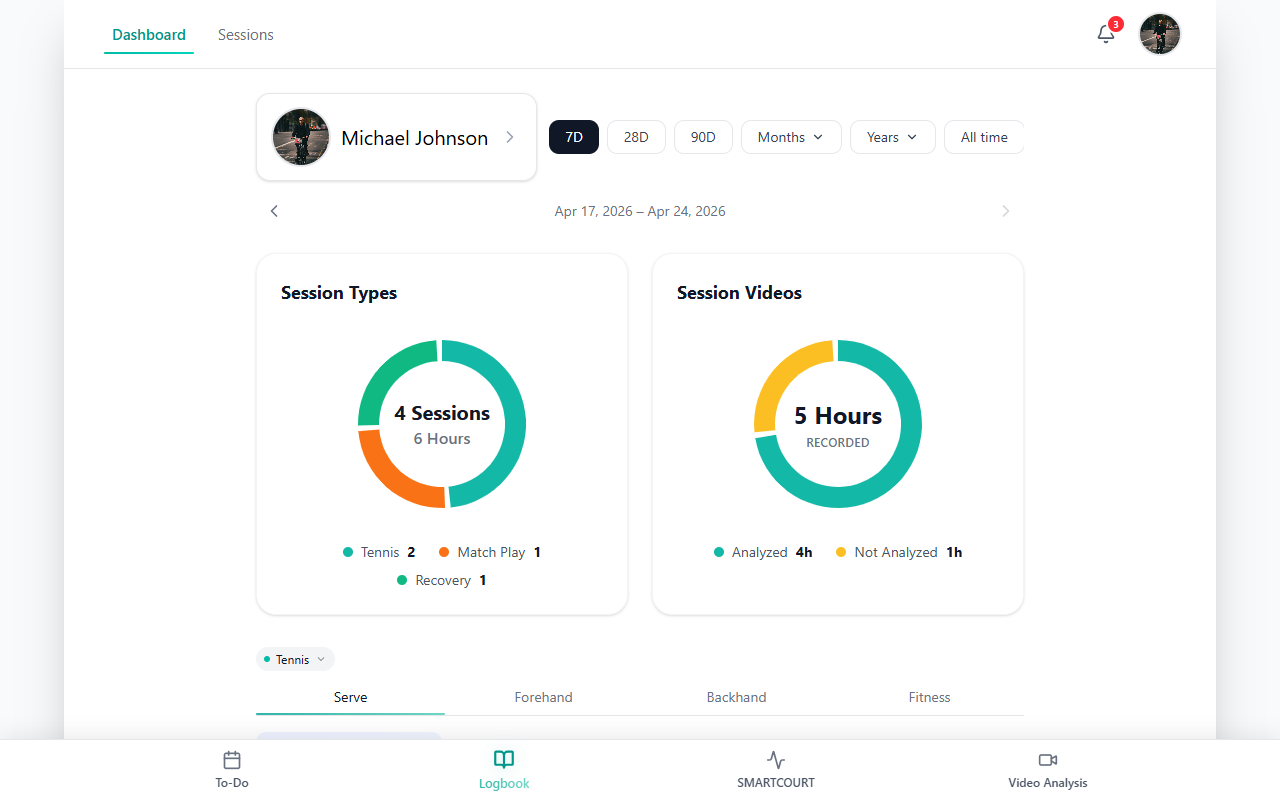
Logbook is the athlete-centered training history.
It brings together planned work, completed sessions, match history, video records, statistics, analytics, and development trends.
Use Logbook when you need to:
- review training history;
- understand progress over time;
- open past sessions;
- connect video with session records;
- compare training blocks;
- identify where attention should go next.
For coaches, Logbook provides a clearer view of athlete development. For athletes, it helps make improvement more visible and less dependent on memory.
Training Hub
Training Hub is the training content library.
It helps users browse drills, routines, session content, and saved materials. Users can open details, judge whether a piece of content fits the athlete’s goal, and save useful items for future use.
Use Training Hub when you need to:
- find drills;
- prepare training sessions;
- save favorite content;
- build a personal coaching library;
- support independent athlete practice;
- create more repeatable training structures.
Training Hub is where ready-made training content and personal methodology come together.
Development Plans
Development Plans help users structure training across a wider time frame.
They support weekly planning, training organization, and the connection between longer-term goals and day-to-day execution.
Use Development Plans when you need to:
- plan the training week;
- organize sessions across multiple days;
- connect training plans with locations and routines;
- support long-term development rather than isolated sessions;
- move from weekly structure into Today for execution.
Development Plans help ensure that training is not only active, but also intentional.
Smart Court
Smart Court connects court-based training with the digital development workflow.
It is location-aware, helps surface planned events for a place, allows users to start sessions quickly, and supports camera and recording workflows. For a guided tour of the main areas, see Interface overview.
Use Smart Court when you need to:
- start on-court sessions;
- connect cameras or video sources;
- prepare a session from a court view;
- manage session recording;
- connect live activity with later review;
- move from training into Logbook and Video Analysis.
Smart Court helps make the court part of the broader development system.
Video Analysis
Video Analysis is the workspace for reviewing footage and turning it into practical feedback.
Users can create or open video projects, import footage, add video from session recordings, slow down playback, mark key moments, add notes, and use Assist questions when available.
Use Video Analysis when you need to:
- review training or match footage;
- study technique, movement, and decision-making;
- prepare for competition;
- analyze opponents where appropriate;
- connect visual evidence with performance trends;
- support coaching conversations with clearer examples.
Video Analysis helps users understand not just that a session happened, but what actually happened inside it.
Analytics & Progress
Analytics & Progress helps users understand development over time.
It connects structured training data, stored video, review context, and AI-supported recognition to help identify useful metrics, patterns, and signals.
Use Analytics & Progress when you need to answer questions such as:
- What is improving?
- What is staying flat?
- Where are the weaknesses?
- Which training blocks are producing better results?
- What should the next training focus be?
This helps turn training history into practical development insight.
AI Support That Enhances Coaching Decisions
CoachEye uses AI-supported analysis to make video review and progress tracking more useful.
AI can help identify useful metrics, patterns, and signals inside training data and video, making review faster, deeper, and more scalable — Analytics & Progress. In Video Analysis, users can also ask Assist questions in plain language when they are available in your workspace — Video Analysis.
But CoachEye is not designed to replace professional coaching judgment. The product is explicitly not positioned as a substitute for a coach as the sole source of technical feedback — see Version limitations & MVP.
Instead, AI supports the training process by helping users:
- find important moments faster;
- review footage more consistently;
- connect video with performance data;
- make coaching conversations more objective;
- turn session history into clearer development decisions.
The coach remains central. AI helps make the coach’s work more informed, more scalable, and easier to explain.
Why Teams Choose CoachEye
One connected development system
CoachEye is not just a calendar, video folder, drill library, or analytics dashboard.
Its value comes from connecting these parts into one training system:
- daily planning;
- weekly development structure;
- reusable drills and sessions;
- Smart Court capture;
- video review;
- analytics;
- long-term training history.
This reduces fragmentation and helps users keep training decisions connected to real development context.
Video connected to real training context
Video is most useful when it is connected to the athlete, session, drill, match, development goal, and training history it belongs to.
CoachEye helps make video part of the development loop, not just a separate media archive. Users can capture what happened, review it later, connect it to session history, and apply the learning to future training — Video & Smart Court · Video Analysis.
Progress that is easier to explain
Development is often difficult to understand from one session or one match.
CoachEye helps users review progress over time through Logbook, session records, video, dashboards, analytics, and performance trends when available — Logbook · Analytics & Progress.
This makes development easier to explain to athletes, parents, coaches, and club leadership.
Better coaching organization
For coaches, CoachEye helps reduce reliance on scattered notes, disconnected tools, and memory.
It supports structured session records, searchable training history, stored video, AI-supported analysis, and performance trends over time — For Coaches.
That makes it easier to manage more athletes without losing individual attention.
A scalable system for clubs and academies
For clubs and academies, CoachEye helps create a shared operational standard.
It supports a more transparent development system where training structure, delivery quality, player progress, and coaching processes are easier to see and manage — For Clubs & Academies.
This helps clubs move from a collection of individual coaching efforts to a more connected performance system.
More visibility for parents
For parents, CoachEye creates a clearer view of the athlete’s development.
Structured session history, visible progress trends, stored video, and AI-supported analysis when available help parents have better conversations and make more informed decisions — For Parents.
Parents do not need to manage every training detail. But they can better understand whether the process is structured, consistent, and moving in the right direction.
More ownership for athletes
For individual athletes, CoachEye provides a real development system.
Today helps manage the current day. Logbook helps review history and progress. Training Hub provides drills and reusable content. Video Analysis supports review and AI-powered insight when available — For Individual Athletes.
This gives serious athletes more structure, better feedback, and a clearer way to improve.
Designed with a Clear Focus
CoachEye is focused on racquet-sport training workflows, especially tennis-oriented planning, video review, Smart Court sessions, analytics, and development tracking.
It is not positioned as:
- a generic fitness-only app without tennis-specific workflows;
- a full league or tournament operations platform;
- an automated officiating or line-calling system;
- a replacement for professional coaching judgment — Version limitations & MVP.
Some capabilities may depend on product version, camera setup, capture conditions, connectivity, permissions, and implementation details. Camera quality and placement can affect analysis results, and privacy or consent requirements may apply when video and biometric-adjacent data are processed — Version limitations & MVP.
This clear scope helps CoachEye stay focused on what matters most: improving the training and development process.
Explore the documentation
Use these guides when you want a faster route into a specific part of CoachEye.